
大家好,我是超哥。今天教大家在本地部署 Hermes Agent,完全本地 AI 大模型,不需要 API、完全免费、离线也能用,还会教大家怎么接入 Telegram 和 微信,跟着教程做,小白也能轻松搞定。
一、安装Windows Terminal
Windows 终端程序是一款新式、快速、高效、强大且高效的终端应用程序,适用于命令行工具和命令提示符,PowerShell和 WSL 等 Shell 用户。主要功能包括多个选项卡、窗格、Unicode、和 UTF-8 字符支持,GPU 加速文本渲染引擎以及自定义主题、样式和配置。
下载地址:https://apps.microsoft.com/detail/9n0dx20hk701?hl=zh-CN&gl=CN
二、安装 WSL
在 PowerShell(管理员)执行安装WSL命令:
wsl --install
安装完成后重启电脑,然后安装Ubuntu命令:
wsl --install -d Ubuntu
打开Windows Terminal,来到ubuntu
三、更新Ubuntu系统
更新Ubuntu系统命令:
sudo apt update
sudo apt upgrade -y
四、安装环境
1. 安装 Python
安装 Python命令:
sudo apt install python3-pip python3-venv -y
2. 安装解压缩软件
安装解压缩软件命令:
sudo apt install -y zstd
3. 安装nodejs
安装 nodejs 命令:
curl -fsSL https://deb.nodesource.com/setup_22.x | sudo -E bash -
sudo apt install -y nodejs
4. 安装 Git
安装 Git 命令:
sudo apt update
sudo apt install -y git
检查有没有成功:
node -v
npm -v
git --version
五、安装ollama

ollama官网:https://ollama.com/
安装 ollama 命令:
curl -fsSL https://ollama.com/install.sh | sh
六、下载安装Ollama Gemma 4 AI模型
Ollama Gemma 4 模型列表:https://ollama.com/library/gemma4
Gemma 4官方介绍:https://deepmind.google/models/gemma/gemma-4/
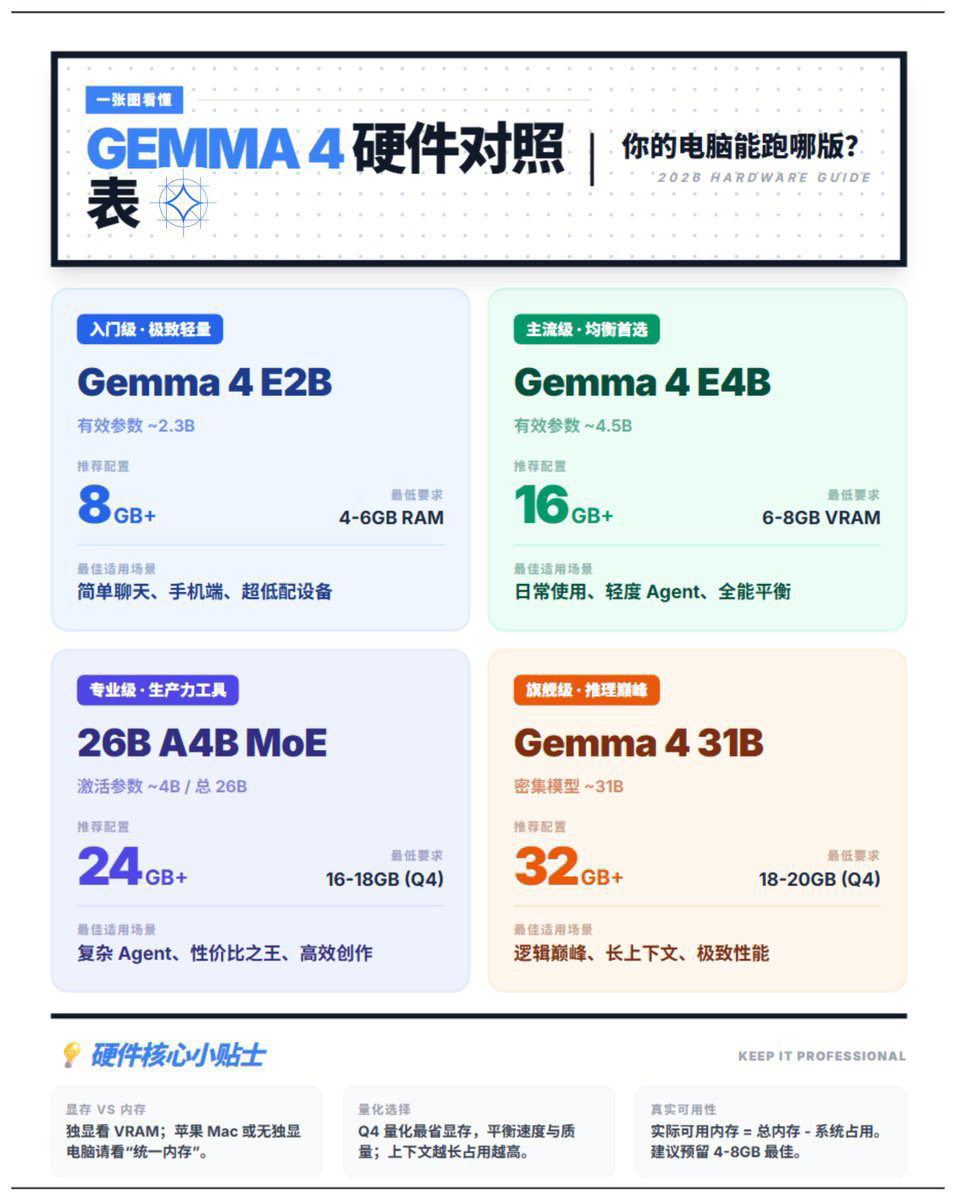
gemma4:e2b 安装命令:
ollama run gemma4:e2b
gemma4:e4b 安装命令:
ollama run gemma4:e4b
gemma4:26b 安装命令:
ollama run gemma4:26b
gemma4:31b 安装命令:
ollama run gemma4:31b
七、安装配置Hermes Agent
Hermes Agent官网:https://hermes-agent.nousresearch.com/
安装配置 Hermes Agent 命令:
curl -fsSL https://raw.githubusercontent.com/NousResearch/hermes-agent/main/scripts/install.sh | bash
Ollama API base URL:
http://127.0.0.1:11434
Ollama Model name(填自己的模型名称):
gemma4:e4b
执行命令:
source ~/.bashrc
八、Hermes Agent常用命令
启动命令:
hermes
配置命令:
hermes setup
接入聊天平台命令:
hermes setup gateway
更新命令:
hermes update
九、对接Telegram
接入聊天平台命令:
hermes setup gateway
创建Bot机器人
BotFather
获取User ID机器人
@userinfobot